setAttribute(PDO::ATTR_TIMEOUT, 10); $pdo->exec("SELECT 0"); return $pdo; } catch(Exception $exception) { try { $error = $exception; $pdo = new PDO("sqlite:$filename"); $pdo->exec("SELECT 0"); return $pdo; } catch(Exception $exception2) { $error = $exception2; } } return $pdo; } function sqlite_escape_string($sql) { $sql = str_replace("'", "''", $sql); return $sql; } function sqlite_exec($pdo, $sql, &$error) { $rowsaffected = $pdo->exec($sql); if($rowsaffected === FALSE) { $errorinfo = $pdo->errorInfo(); $error = $errorinfo[2]; } } function sqlite_query($pdo, $sql, $fetchtype = SQLITE_ASSOC, &$error = '') { $statement = $pdo->query($sql); if($statement === FALSE) { $errorinfo = $pdo->errorInfo(); $error = $errorinfo[2]; } if($fetchtype == SQLITE_NUM) $statement->setFetchMode(PDO::FETCH_NUM); else if($fetchtype == SQLITE_ASSOC) $statement->setFetchMode(PDO::FETCH_ASSOC); else if($fetchtype == SQLITE_BOTH) $statement->setFetchMode(PDO::FETCH_BOTH); return $statement; } function sqlite_fetch_array(&$statement) { $array = $statement->fetch(); return $array; } function sqlite_fetch_single($statement) { $res = $statement->fetchColumn(); return $res; } function sqlite_close($pdo) { unset($pdo); } } //======================== DETECT =============================== if($action == 'detect') { echo 'OK'; exit(); } //======================== CREATE DB ============================ if(!file_exists($SS_DATABASE_FILENAME)) { $error = ''; $dbpointer = sqlite_open($SS_DATABASE_FILENAME, 0666, $error); if($error != '') { error_log("ERR 124: $error"); return; } $error = ''; sqlite_exec($dbpointer, 'CREATE TABLE pageview ( id INTEGER PRIMARY KEY ASC, fkbefore INTEGER, fkuser INTEGER, created DATETIME, url VARCHAR(400) ); CREATE TABLE user ( id INTEGER PRIMARY KEY ASC, uid VARCHAR(200), activity DATETIME, created DATETIME, ip VARCHAR(15), sourceurl VARCHAR(400), user_agent VARCHAR(500), http_accept VARCHAR(500), language VARCHAR(5), resolution VARCHAR(15), colors VARCHAR(20), plugins TEXT, sessiondata TEXT ); CREATE INDEX user_uid ON user(uid); CREATE INDEX user_user_agent ON user(user_agent); CREATE INDEX pageview_fkuser ON pageview(fkuser); CREATE INDEX pageview_created ON pageview(created);', $error); if($error != '') { error_log("ERR 162: $error"); return; } } else { $error = ''; $dbpointer = sqlite_open($SS_DATABASE_FILENAME, 0666, $error); if($error != '') { error_log("ERR 173: $error"); return; } } //=============================== LOG ========================================= if($action == '' || $action == 'update') { //retrieve values from _SERVER and _COOKIE $uid = isset($_COOKIE['SS_uid']) ? $_COOKIE['SS_uid'] : ''; $url = sqlite_escape_string($_SERVER['REQUEST_URI']); $ip = $_SERVER['REMOTE_ADDR']; $user_agent = sqlite_escape_string($_SERVER['HTTP_USER_AGENT']); $http_accept = sqlite_escape_string($_SERVER['HTTP_ACCEPT']); $selfhost = isset($_SERVER['HTTP_HOST']) ? $_SERVER['HTTP_HOST'] : $_SERVER['SERVER_NAME']; $sourceurl = isset($_SERVER['HTTP_REFERER']) ? sqlite_escape_string($_SERVER['HTTP_REFERER']) : ''; $matches = array(); if(preg_match_all("/\\[[A-Za-z0-9_]*\\]/i", $SS_SESSION_FIELDS, $matches) > 0) { $sessiondata = $SS_SESSION_FIELDS; $hasdata = FALSE; foreach($matches[0] as $match) { $matchkey = trim(trim($match, '['), ']'); if(isset($SS_SERVER_DATA[$matchkey]) && ''.$SS_SERVER_DATA[$matchkey] != '') { $sessiondata = str_replace($match, $SS_SERVER_DATA[$matchkey], $sessiondata); $hasdata = TRUE; } else $sessiondata = str_replace($match, '', $sessiondata); } if(!$hasdata) $sessiondata = ''; } $language = isset($_COOKIE['SS_language']) ? sqlite_escape_string($_COOKIE['SS_language']) : ''; $resolution = isset($_COOKIE['SS_resolution']) ? sqlite_escape_string($_COOKIE['SS_resolution']) : ''; $colors = isset($_COOKIE['SS_colors']) ? sqlite_escape_string($_COOKIE['SS_colors']) : ''; $plugins = isset($_COOKIE['SS_plugins']) ? sqlite_escape_string($_COOKIE['SS_plugins']) : ''; if($url != '/favicon.ico' && $url != '/robots.txt') { if(stripos($sourceurl, $selfhost) >= 5 && stripos($sourceurl, $selfhost) <= 11) $sourceurl = ''; //merge bots if(''.$uid == '') { $botdefs = array('googlebot', 'yandexbot', 'bingbot', 'baiduspider', 'yahoo', 'mj12bot'); foreach($botdefs as $botdef) { if(stripos('__'.$user_agent, $botdef) > 1) { $res = sqlite_query($dbpointer, "SELECT uid FROM user WHERE user_agent = '$user_agent'", SQLITE_NUM, $error); $uid = ''.sqlite_fetch_single($res); unset($res); break; } } } //search for user if(''.$uid == '') { $res = sqlite_query($dbpointer, "SELECT uid FROM user WHERE user_agent = '$user_agent' AND ip = '$ip' AND http_accept = '$http_accept' AND activity > date('now', 'localtime', '-10 hour')", SQLITE_NUM, $error); if($error != '') { error_log("ERR 249: $error"); return; } $uid = ''.sqlite_fetch_single($res); unset($res); } //skip doubled pageview if(strlen($user_agent) > 2 && $url == '/' && ''.$sourceurl == '' && $http_accept == '*/*') { return; } //generate new one if(''.$uid == '') { $uid = sha1($ip.'|'.$user_agent.'|'.mt_rand(0x19A100, 0x39AA3FF)); } $sessiondata = iconv("UTF-8", "Windows-1252", $sessiondata); $sourceurl = iconv("UTF-8", "Windows-1252", $sourceurl); $url = iconv("UTF-8", "Windows-1252", $url); if($action == 'update') { $sql = "UPDATE user SET ip = '$ip', language = CASE WHEN '$language' = '' THEN language ELSE '$language' END, resolution = CASE WHEN '$resolution' = '' THEN resolution ELSE '$resolution' END, colors = CASE WHEN '$colors' = '' THEN colors ELSE '$colors' END, plugins = CASE WHEN '$plugins' = '' THEN plugins ELSE '$plugins' END WHERE uid = '$uid'"; $error = ''; sqlite_exec($dbpointer, $sql, $error); if($error != '') { error_log("ERR 286: $error"); return; } } else { //check if user already exist $error = ''; $res = sqlite_query($dbpointer, "SELECT id FROM user WHERE uid = '$uid'", SQLITE_NUM, $error); $fkuser = ''.sqlite_fetch_single($res); unset($res); if($error != '') { error_log("ERR 299: $error"); return; } if($fkuser == '') { //insert new user row. $sql = "INSERT INTO user ( uid, created, activity, ip, sourceurl, user_agent, http_accept, sessiondata, language, resolution, colors, plugins ) VALUES ( '$uid', datetime('now', 'localtime'), datetime('now', 'localtime'), '$ip', '$sourceurl', '$user_agent', '$http_accept', '$sessiondata', '$language', '$resolution', '$colors', '$plugins' );"; $error = ''; sqlite_exec($dbpointer, $sql, $error); if($error != '') { error_log("ERR 339: $error"); return; } $res = sqlite_query($dbpointer, "SELECT last_insert_rowid()"); $fkuser = ''.sqlite_fetch_single($res); unset($res); } else { $sql = "UPDATE user SET ip = '$ip', sessiondata = CASE WHEN '$sessiondata' = '' THEN sessiondata ELSE '$sessiondata' END, http_accept = '$http_accept', activity = datetime('now', 'localtime'), sourceurl = CASE WHEN sourceurl <> '' AND sourceurl IS NOT NULL THEN sourceurl WHEN ('$sourceurl' = '') THEN sourceurl ELSE '$sourceurl' END WHERE id = $fkuser"; $error = ''; sqlite_exec($dbpointer, $sql, $error); if($error != '') { error_log("ERR 367: $error"); return; } } $res = sqlite_query($dbpointer, "SELECT MAX(id) FROM pageview WHERE fkuser = $fkuser"); $fkbefore = ''.sqlite_fetch_single($res); unset($res); if($fkbefore == '') $fkbefore = 'NULL'; //insert pageview log $sql = "INSERT INTO pageview ( fkuser, fkbefore, created, url ) VALUES ( $fkuser, $fkbefore, datetime('now', 'localtime'), '$url' );"; $error = ''; sqlite_exec($dbpointer, $sql, $error); if($error != '') { error_log("ERR 394: $error"); return; } } //delete pageviews of bots older than 10 minutes $botnames = array('googlebot', 'bingbot', 'mj12bot', 'netsprint', 'baiduspider', 'yandexbot', 'ahrefsbot'); foreach($botnames as $botname) { if(stripos('_'.$user_agent, $botname) > 1) { $sql = "DELETE FROM pageview WHERE uid = '$uid' AND created < datetime('now', 'localtime', '-10 minute')"; sqlite_exec($dbpointer, $sql, $error); break; } } if($action != 'update') { ?> <", ""); $dxmlgz = tempnam(":\n\\/?><", ""); $xr = xmlwriter_open_uri($dxml); xmlwriter_start_document($xr, '1.0" encoding="Windows-1252'); xmlwriter_start_element($xr, 'root'); $islog = FALSE; //users xmlwriter_start_element($xr, 'user'); $sql = "SELECT id, created, activity, ip, sourceurl, user_agent, http_accept, sessiondata, language, resolution, colors, plugins FROM user"; if($fromactivity != '') $sql .= " WHERE activity > datetime('$fromactivity')"; $error = ''; $res = sqlite_query($dbpointer, $sql, SQLITE_ASSOC, $error); if($error != '') { error_log("ERR 546: $error"); return; } while($row = sqlite_fetch_array($res)) { xmlwriter_start_element($xr, 'row'); $colindex = 0; foreach($row as $key => $val) { $islog = TRUE; xmlwriter_write_element($xr, 'c'.$colindex, $val); $colindex++; } xmlwriter_end_element($xr); } xmlwriter_end_element($xr); unset($res); //pageviews xmlwriter_start_element($xr, 'pageview'); $sql = "SELECT id, fkuser, fkbefore, created, url FROM pageview"; if($fromid != '') $sql .= " WHERE id > $fromid "; $sql .= " ORDER BY id ASC "; $error = ''; $res = sqlite_query($dbpointer, $sql, SQLITE_ASSOC, $error); if($error != '') { error_log("ERR 577: $error"); return; } while($row = sqlite_fetch_array($res)) { xmlwriter_start_element($xr, 'row'); $colindex = 0; foreach($row as $key => $val) { $islog = TRUE; xmlwriter_write_element($xr, 'c'.$colindex, $val); $colindex++; } xmlwriter_end_element($xr); } xmlwriter_end_element($xr); unset($res); // xmlwriter_end_element($xr); xmlwriter_end_document($xr); xmlwriter_flush($xr); //compress GZIP $fs = fopen($dxml, 'rb'); $gz = gzopen($dxmlgz, 'w5'); while (!feof($fs)) { $buffer = fread($fs, 1000); gzwrite($gz, $buffer); } gzclose($gz); fclose($fs); //compress if(!$islog) { header('Content-Description: File Transfer'); header('Content-Type: none'); header('Expires: 0'); header('Cache-Control: must-revalidate, post-check=0, pre-check=0'); header('Pragma: public'); } else if (file_exists($dxmlgz)) { header('Content-Description: File Transfer'); header('Content-Type: application/x-gzip'); header('Content-Disposition: attachment; filename=download.xml.gz'); header('Expires: 0'); header('Cache-Control: must-revalidate, post-check=0, pre-check=0'); header('Pragma: public'); header('Content-Length: '.filesize($dxmlgz)); readfile($dxmlgz); } else if (file_exists($dxml)) { header('Content-Description: File Transfer'); header('Content-Type: text/xml'); header('Content-Disposition: attachment; filename=download.xml'); header('Expires: 0'); header('Cache-Control: must-revalidate, post-check=0, pre-check=0'); header('Pragma: public'); header('Content-Length: '.filesize($dxml)); readfile($dxml); } if(file_exists($dxml)) unlink($dxml); if(file_exists($dxmlgz)) unlink($dxmlgz); } sqlite_close($dbpointer); if(isset($dbpointer)) unset($dbpointer); ?> admin, Author at Verdocs https://verdocs.com/author/admin/ Mon, 29 Dec 2025 15:22:40 +0000 en-US hourly 1 https://wordpress.org/?v=6.8.5 https://verdocs.com/wp-content/uploads/2020/04/Verdocs_FaveIcon.png admin, Author at Verdocs https://verdocs.com/author/admin/ 32 32 APPCOM builds a cutting-edge mobile app with embedded eSignature workflows https://verdocs.com/appcom-builds-a-cutting-edge-mobile-app-with-embedded-esignature-workflows/ Thu, 06 Feb 2025 16:56:07 +0000 https://verdocs.com/en/?p=12676 Company: Something else: something else: About APPCOM Based in Montreal, Canada, and established in 2011 by Jean-Christophe Duchaine, APPCOM is a software development studio that builds tailor-made mobile apps and applicative Web ecosystem solutions for mid-size and large North American organizations. As the tech-agnostic Canadian team of 50, it partners to address the development of […]

The post APPCOM builds a cutting-edge mobile app with embedded eSignature workflows appeared first on Verdocs.

]]>

APPCOM builds a cutting-edge mobile app with embedded eSignature workflows

Company:

Something else:

something else:

About APPCOM

Based in Montreal, Canada, and established in 2011 by Jean-Christophe Duchaine, APPCOM is a software development studio that builds tailor-made mobile apps and applicative Web ecosystem solutions for mid-size and large North American organizations. As the tech-agnostic Canadian team of 50, it partners to address the development of digital products in an agile and flexible manner that meets the objectives and growth strategies of its clients.

The Challenge: Evaluate and implement embedded eSignature solution for custom application

In 2021 and post-COVID, AppCom was tasked with embedding document workflows and execution in a custom application for a client (not to be disclosed for this case study). The client sought a fully white-labeled and native eSignature experience for simple and complex templates within the application that APPCOM was tasked to build. Customizability was a project requirement and a key component in the evaluation process.

“Our client contracted with AppCom to build an end-to-end B2B solution, where embedded eSignature capabilities of the project were a key requirement. It was clear from the onset that existing eSignature vendors in the market would not meet our client’s needs, so we started a search process to find a highly flexible and embedded solution.”

The Solution: Custom Application with Embedded Document Workflows

AppCom connected with Verdocs during the technology evaluation process and saw that Verdocs embedded solution would meet their client’s needs. Given the complex needs of their clients, having direct access to the Verdocs team to help speed up the implementation and meet their clients needs.

Jean-Christophe says, “The collaboration on the technical side was really interesting and a big plus. It was the first time we had ever talked to the dev team that was actually working on the API and back-end. Not only was it easier to collaborate, but we spoke the same language, which usually when you implement a third-party solution, you don’t really talk to a technical person.”

By working closely with Verdocs, AppCom commitment to deadlines was keep intact. AppCom was able to deliver the end solution for their client in days rather than several weeks while delivering capabilities that exceed their client’s expectations.

The post APPCOM builds a cutting-edge mobile app with embedded eSignature workflows appeared first on Verdocs.

]]>
Tag Recognition in Template Documents https://verdocs.com/tag-recognition-templates/ Mon, 15 Apr 2024 14:56:25 +0000 https://verdocs.com/en/?p=10673 April 7, 2024   If you are developing an application that automates e-signing workflows, placing signature fields in a document in the correct locations can be a challenge. To help simplify this process, Verdocs can now automatically recognize “tags” in documents and replace them with signature fields. Dynamic Field Tags A “tag” is just a […]

The post Tag Recognition in Template Documents appeared first on Verdocs.

]]>
April 7, 2024


If you are developing an application that automates e-signing workflows, placing signature fields in a document in the correct locations can be a challenge. To help simplify this process, Verdocs can now automatically

recognize “tags” in documents and replace them with signature fields.

Dynamic Field Tags

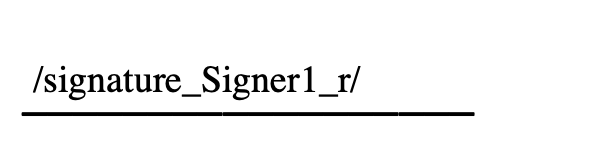
A “tag” is just a text element in a specific format. When we detect these, we will remove the text tag and replace it with a live signature field control. 

When generating documents dynamically, these tags can be placed on the fly as documents are generated to mark where signature fields should be placed. This avoids the need to perform complex calculations to determine X,Y coordinates for those fields.

Tag Formats

A tag is identified by starting and ending with a forward slash “/” with a field type, role name, and optional settings separated by underscore “_” characters. Roles will automatically be created for each role name seen.

Role names are case-sensitive and will become the keys used to identify submitted data in final documents, such as for text fields. They must be 3-15 characters long and contain no spaces or other special characters (hyphens are allowed).

Examples

/signature_Signer1_r/ – Required signature field for “Signer1”.

/textbox_Signer1/ – Optional text field for Signer1.

/textbox_Signer2_r_200/ – Required text field for Signer2, override width to 200px (default is 150).


Field Types

The following field types are supported:

  • signature – A signature field
  • initial – An initials field (note that the type is singular)
  • date – A user-selectable date with a date picker.
  • timestamp – A system-generated timestamp that will be automatically set when a signer acts on the document.
  • textbox – A single-line text field (defaults to 150pt wide)
  • textarea – A multi-line text field (defaults to 4 rows).

Settings

Two settings may be applied at this time:

  • “r” – Mark the field required
  • “###” – An integer value will be treated as a field width, overriding any defaults. Note that this will be ignored for Signature and Initial type fields.

If you have any questions or need further assistance, please contact Verdocs through the support chat within your account or contact support@verdcos.com

The post Tag Recognition in Template Documents appeared first on Verdocs.

]]>
Product Overview & Legality Guide https://verdocs.com/product-overview-legality-guide/ Wed, 15 Sep 2021 01:52:21 +0000 https://verdocs.com/en/?p=9877 If you considering Verdocs for your day-to-day operations, we want to take the opportunity to outline how Verdocs is legally binding. We feel it is our goal that you have full confidence in all documents being executed on our platforms. 1. Legally Binding Electronic Signatures  Verdocs has gone to great lengths to meet and exceed […]

The post Product Overview & Legality Guide appeared first on Verdocs.

]]>

If you considering Verdocs for your day-to-day operations, we want to take the opportunity to outline how Verdocs is legally binding. We feel it is our goal that you have full confidence in all documents being executed on our platforms.

1. Legally Binding Electronic Signatures 

Verdocs has gone to great lengths to meet and exceed the requirements in U.S. electronic signing laws. 

All documents e-signed through Verdocs are legally binding and comply with US laws (E-Sign Act and UETA).

2. Digital Signatures & Tamperproof

Verdocs’ digital signatures use a standard, accepted format called Public Key Infrastructure (PKI), to provide the highest levels of security and universal acceptance. 

Such best-in-class implementation of digital signatures and tamperproof seal ensures you and your signers will never question document integrity. 

3. Signer Authentication

All signers must be authenticated and consent to electronically sign your document.  Verdocs offers four types of authentication.  

These various methods of authentication give you the flexibility to authenticate your signers as you wish and ensure the signers are the intended recipients for documents. 

A document certificate is issued with every signed document outlining key details:  

1. Audit Trail 
2. IP Address 
3. Date of Signing 
4. Signature Key
5. Authentication Method

If you have any questions or need further assistance, please contact Verdocs through the support chat within your account or contact support@verdcos.com

The post Product Overview & Legality Guide appeared first on Verdocs.

]]>
New Field Types, Verdocs Certificates, & More https://verdocs.com/new-field-types-verdocs-certificates-more/ Mon, 08 Jun 2020 14:48:19 +0000 https://verdocs.mark2.oablab.com/?p=8889 We are always working on new ways to make business easier for our customers. Release Notes is our regular update which highlights recent product improvements that our team has made so you can easily stay up to date on what’s new.

The post New Field Types, Verdocs Certificates, & More appeared first on Verdocs.

]]>

We are always working on new ways to make business easier for our customers. Release Notes is our regular update which highlights recent product improvements that our team has made so you can easily stay up to date on what’s new.

Page size & Rotation

You can now upload any PDF document of any page size and/or rotation. There is no need to reformat the document prior to uploading.


3 new field types

Radio button group

The buttons are placed as a group and you can add, remove, or position the individual buttons.

Checkbox group

Checkbox allows the recipient to select one or more options. You can define the minimum required options and/or a maximum number of options to be selected based on the document’s needs.

Dropdown menu

Dropdown menu allows a recipient to choose one option from a group of options, and for the option value to be printed on the document . You can define the options for your recipient to choose from the builder.


Verdocs Details

Upon recipient completion, the user is directed to an Verdocs Details page that provides an interface showing the Verdoc details, recipients, and event history of the document.


Verdoc Certificate

Upon Verdoc completion, a digitally signed, tamper-proof PDF Certificate is generated and shared to all participants as a separate attachment.  The certificate is also available in the Details page for future access through the original invitation link. The certificate recaps granular data about the Verdoc details, recipients, and event history in PDF format.  With this functionality, you can be confident that all of your electronic signatures are protected by the Uniform Electronic Transactions Act.


Signer task and error feature

To guide recipients to a successful submission, we have added a task and error management feature. The feature notifies recipients of fields that still require input, and guides recipients to each field until the Verdoc is ready to be submitted.

The post New Field Types, Verdocs Certificates, & More appeared first on Verdocs.

]]>
New Builder, Shared Documents & Review Page https://verdocs.com/new-builder-shared-documents-review-page/ Mon, 08 Jun 2020 14:46:48 +0000 https://verdocs.mark2.oablab.com/?p=8890 We are always working on new ways to make business easier for our customers. Release Notes is our regular update that highlights recent product improvements, so you can easily stay up to date on what’s new.

So, What’s new?

The post New Builder, Shared Documents & Review Page appeared first on Verdocs.

]]>

We are always working on new ways to make business easier for our customers. Release Notes is our regular update that highlights recent product improvements, so you can easily stay up to date on what’s new.

So, What’s new?

New Builder Experience

Your document creation experience just got easier! The builder has an embedded wizard experience, that guides users step by step to (1) add source docs, (2) add roles, (3) add field types and leads users to our review page, where users can create the document’s first verdoc.


Review + Create Verdocs

he review page is an important new focus of our application. It leads all users that have access to review the document’s source docs, roles and field types prior to creating a Verdoc. The page includes a ‘create Verdoc’ overlay that allows users easily create and modify all settings and features of a new Verdoc. Our near term roadmap includes extending the create verdoc overlay to the other pages, as well as adding advanced recipient and Verdoc settings for modification by users.


Tooltips

For added guidance, we created tooltips that explain why certain buttons are greyed out and to introduce new features in detail.

App Settings for Organizations

In this release, organizations administrators can customize their organization’s base member privileges. A key benefit of this feature is the light weight maintenance required for administrators to manage access to shared documents for usage across an organization.

After an organization has been set up, organization administrators can restrict members from creating (or deleting) private or organization documents. Organization administrators can provide base privileges for its members to ‘review and create Verdocs’ from shared documents, or administrators can extend full edit privileges members. This fine grain access provides a flexible architecture to adapt settings to meet your organizations needs. To learn more about this important feature please visit our help center, or reach out to our support staff.

Improved browser compatibility

To make sure that you and your signers have the best experience using our platform, we improved our browser compatibility. We suggest using Chrome for the best user experience. We are constantly working on improving experience with Firefox, Safari, Edge and in this release we added Internet Explorer.

Blog

We aim to give you variety of resources to empower you to be your best! In addition to our e-signature tool we release industry specific resources. Real Estate is currently our fastest growing industry and to support our users we will be constantly releasing new content. Check out our latest blog post on “10 Tips on Becoming a Successful Real Estate Agent”. Let us know in the blog comments what topic should be next!

We are always working to make our e-signature solution more valuable for our users and welcome your feedback. Comment below to let us know your thoughts and what new features you want to see!

The post New Builder, Shared Documents & Review Page appeared first on Verdocs.

]]>
In-Person Signing & SMS https://verdocs.com/in-person-signing-sms/ Mon, 08 Jun 2020 14:42:23 +0000 https://verdocs.mark2.oablab.com/?p=8884 Release Notes is our regular update that highlights recent product improvements, so you can easily stay up to date on what’s new. We are always working on new ways to make business easier for our customers and value all the user feedback we have received to date.

So, What’s new?

The post In-Person Signing & SMS appeared first on Verdocs.

]]>

Release Notes is our regular update that highlights recent product improvements, so you can easily stay up to date on what’s new. We are always working on new ways to make business easier for our customers and value all the user feedback we have received to date.

So, What’s new?

1. In-Person Signing Link

Verdocs’ in-person signing link feature enables creators to access and share access to their Verdoc for electronic signature. After a Verdoc has been created and sent, an in-person link can be retrieved and provided to the recipient through any channel of communication. To learn more, please visit the in-person signing link post in the help center.


2. SMS / Text Messages

Verdocs now enables creators to send a Verdoc invite link via SMS. Signers can open documents and electronically sign without ever having to open their email or logging into their account. To learn more, please visit the SMS post in the help center.

The post In-Person Signing & SMS appeared first on Verdocs.

]]>
Quick tip: How to Send Verdocs for Approval https://verdocs.com/approver-real-estate-2/ Tue, 02 Jun 2020 14:18:02 +0000 https://verdocs.mark2.oablab.com/?p=8605 Add an Approver as a gatekeeper for the Verdocs before it reaches the intended final recipient Need an extra set of eyes to review your Verdoc before it reaches the client? You can use the option of adding an approver to look over the information…

The post Quick tip: How to Send Verdocs for Approval appeared first on Verdocs.

]]>
Add an Approver as a gatekeeper for the Verdocs before it reaches the intended final recipient

Need an extra set of eyes to review your Verdoc before it reaches the client? You can use the option of adding an approver to look over the information before it reaches the designated recipient. You also have an option to CC email a copy of the final Verdocs, keeping interested parties in the loop.

Approval process saves you time by creating an automated internal workflow, allowing managers to review a document prior to sending.

Example:  you can add a property manager as an approver in order to confirm that all the information is filled out correctly before it reaches the tenant or the owner of the property for error-free signing. Once the approver reviewed the documents and clicks the approve button in the bottom right corner, the Verdoc is sent to the next recipient.

You can add an approver from the recipients tab in the document builder view, select your recipients and decide the order you want the Verdoc to be received. To ensure rejected documents are not delivered to the recipients, if the approver rejects the document, a new Verdoc must be created to finish the process,

Try out for yourself how easy it is to send and sign Verdocs with our free trial or request a demo to explore all the features Verdocs has to offer.

If you have any questions, please contact us at support@verdocs.com, message us on our live chat or search for quick answers on our help center.

The post Quick tip: How to Send Verdocs for Approval appeared first on Verdocs.

]]>
Useful Tip: Build a Document to Accelerate Success https://verdocs.com/template-builder-tips/ Tue, 02 Jun 2020 11:49:14 +0000 https://verdocs.mark2.oablab.com/?p=8583 Document Fields allows you to highlight each field that the signer is required to fill out, providing an efficient and refreshingly error-free experience. Verdocs allow you to quickly turn any agreement, contract, or form into a digital document ready to be completed and eSigned from…

The post Useful Tip: Build a Document to Accelerate Success appeared first on Verdocs.

]]>
Document Fields allows you to highlight each field that the signer is required to fill out, providing an efficient and refreshingly error-free experience.A

Verdocs allow you to quickly turn any agreement, contract, or form into a digital document ready to be completed and eSigned from any device. Upload an existing PDF and prepare it for completion using Verdocs’ document builder.  Verdocs documents are re-usable, the builder holds all the default settings for future Verdocs including reminders, field settings, etc. You can easily make fields required, add default values and validators to make sure documents are efficiently and correctly completed.

Switching between recipients when building the form

When building the document you can take advantage of the recipients tab and add as many recipients that your workflow requires. Each recipient will be assigned their own highlighting color to identify the fields which require their signature – providing the most efficient and error free experience. Be sure to select the correct recipient for each of the fields that must be populated.

Using the document builder

The document builder was designed to integrate smoothly with your workflow and increase efficiency in signing contracts.

You can add custom text fields, date pickers, checkboxes, as well as add an option to submit attachments and payments. Place signature, date signed and initials fields on your document for the signer to complete.

Deliver modern experience to your employees and customers by digitizing your workflows and creating faster turnaround.

Try out for yourself how easy it is to send and sign Verdocs with our free trial or request a demo to explore all the features Verdocs  has to offer.

If you have any questions please contact us at support@verdocs.com, message us on our live chat or search for quick answers on our help center.

The post Useful Tip: Build a Document to Accelerate Success appeared first on Verdocs.

]]>
Release notes | Three new field types, Verdocs certificate and more https://verdocs.com/release-notes-3-2019-three-new-field-types-envelope-certificate-and-more/ Tue, 02 Jun 2020 09:52:44 +0000 https://verdocs.mark2.oablab.com/?p=8471 We are always working on new ways to make business easier for our customers. Release Notes is our regular update which highlights recent product improvements that our team has made so you can easily stay up to date on what’s new. Page size & Rotation…

The post Release notes | Three new field types, Verdocs certificate and more appeared first on Verdocs.

]]>

We are always working on new ways to make business easier for our customers. Release Notes is our regular update which highlights recent product improvements that our team has made so you can easily stay up to date on what’s new.

Page size & Rotation

You can now upload any PDF document of any page size and/or rotation. There is no need to reformat the document prior to uploading.


3 new field types

Radio button group


The buttons are placed as a group and you can add, remove, or position the individual buttons.


Checkbox group

Checkbox allows the recipient to select one or more options. You can define the minimum required options and/or a maximum number of options to be selected based on the document’s needs.


Dropdown menu

Dropdown menu allows a recipient to choose one option from a group of options, and for the option value to be printed on the document . You can define the options for your recipient to choose from the builder.


Verdocs Details

Upon recipient completion, the user is directed to an Verdocs Details page that provides an interface showing the Verdoc details, recipients, and event history of the document.


Verdoc Certificate

Upon Verdoc completion, a digitally signed, tamper-proof PDF Certificate is generated and shared to all participants as a separate attachment.  The certificate is also available in the Details page for future access through the original invitation link. The certificate recaps granular data about the Verdoc details, recipients, and event history in PDF format.  With this functionality, you can be confident that all of your electronic signatures are protected by the Uniform Electronic Transactions Act.


Signer task and error feature

To guide recipients to a successful submission, we have added a task and error management feature. The feature notifies recipients of fields that still require input, and guides recipients to each field until the Verdoc is ready to be submitted.


Blog and Knowledge Base

Check back to see our growing resources articles and blog for the latest user tips and advice.

We are always working to make our e-signature solution more valuable for our users and welcome your feedback. Comment below to let us know your thoughts and what new features you want to see!

The post Release notes | Three new field types, Verdocs certificate and more appeared first on Verdocs.

]]>