
From Approved to In Force: Connecting Life Insurance Policy Delivery and Signing
Verdocs Team
Underwriting approval is not the finish line. Here's how to see what remains before a policy is in force.
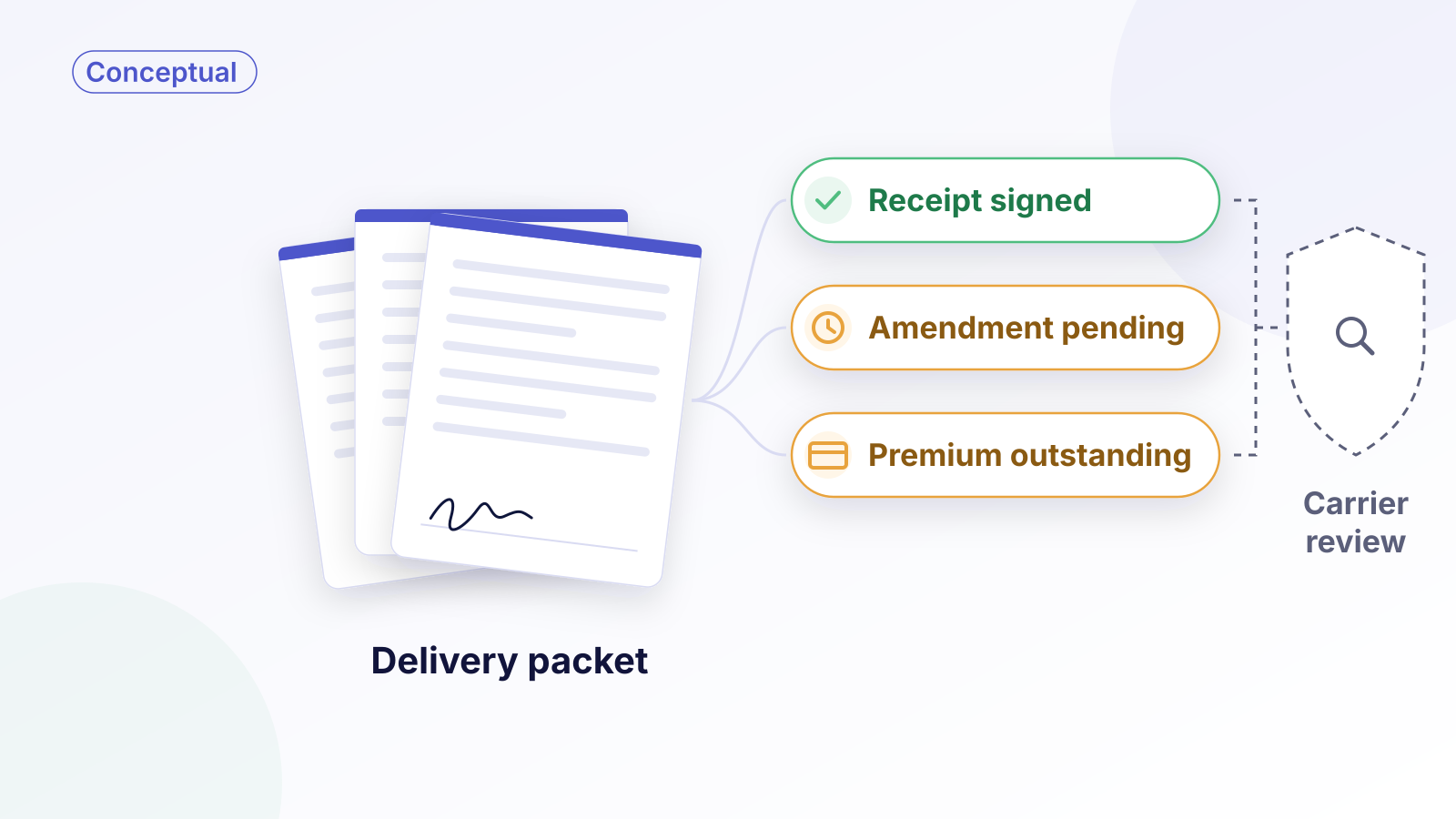
Consider an illustrative case. A term life policy clears underwriting on Monday. The producer tells the client the good news. Two weeks later, the policy still isn't in force: the delivery receipt was signed, but the amendment correcting the beneficiary's name wasn't, and the first premium draft hasn't been authorized.
The case had several open requirements, and the people involved could each see only part of them.
Electronic policy delivery can speed up the signing part of that process. The larger opportunity is making every outstanding requirement visible, so a signed receipt isn't mistaken for a placed policy. This piece is for carrier operations and technology teams designing that workflow, not a guide to any one carrier's delivery instructions.
Approval, issuance, delivery, and in-force status are different milestones
Life new business tends to blur several milestones together:
- Underwriting approval: the carrier has decided to offer coverage on stated terms.
- Issuance: the policy contract is generated.
- Delivery: the policy reaches the owner, with any documents that need signatures.
- Requirements satisfied: every condition the carrier set for this policy has been met.
- In force: coverage takes effect under the policy and its conditions, and the carrier records in-force status.
The sequence and conditions vary by carrier and product. Protective's submission guidance, for example, lists items that may be held as delivery requirements when a policy is issued on a cash-on-delivery basis, including the delivery receipt, premium, amendments, good health statements, payment authorizations, and signed illustrations. It also states that such policies should be delivered only if the insured's health and insurability haven't changed since the application.

The diagram's main point is in that last step: signing completes some requirements, but it doesn't put coverage in force. Coverage takes effect under the policy and applicable conditions; a portal status update records that outcome. Any temporary or conditional coverage, such as coverage under a conditional receipt, has to be handled separately, which is why one sequence can't represent every case.
Build the delivery packet around outstanding requirements
Start with a prerequisite: confirm the customer is eligible for electronic delivery and has consented to it under the applicable process, and keep a fallback for when electronic delivery can't be completed. Banner Life's eDelivery page for advisors, for example, describes an eDelivery authorization form completed with the client, or an opt-in during its tele-app interview, and notes which business the process applies to.
A delivery packet works best when it reflects what is actually outstanding for this policy, not a generic bundle. For one case that might be a delivery receipt and an amendment. For another, it's a statement of good health, a signed illustration, and a premium payment authorization.
Practically, that means:
- Generating each document from a template, with policy data filled in and approved values set as read-only, plus a way for the owner to request a correction instead of signing something they say is wrong.
- Including only the documents this case needs, so the owner isn't asked to sign something irrelevant.
- Tracking each requirement separately, with its own status, owner, and next action.
Signed documents are only some of the requirements. Premium, for instance, may be satisfied through a billing system rather than a signature, and a signed payment authorization isn't the same as funds received. Track those as separate states.
Coordinate agency review and policy-owner signing
Delivery often involves more than the owner, and carriers route policies differently. The process described on that same page, for example, lets a policy go to the general agency first for review, with a set window before it moves to the customer, or to the agency and customer at the same time.
Whatever routing the carrier uses, the design questions are the same. Who sees the packet first? Who signs, and in what order? What happens if the reviewer doesn't act? The answers belong in the workflow configuration, not in someone's inbox.

A shared case view like the one above helps every party see the same picture: what's signed, what isn't, who owns each item, and what happens next.
Route changed information and unsigned requests to the right team
The exception that matters most is a change in the insured's situation. Suppose the owner reviews a statement of good health and indicates that the insured has seen a doctor since the application. A signed statement with that disclosure shouldn't flow straight to placement. The workflow should pause progression and route the case to underwriting review, where the carrier decides what happens next.
Other exceptions need their own paths:
- Unsigned documents: configured reminders and producer follow-up, with expiration as an optional configured response, rather than an open request that sits indefinitely.
- Outstanding premium: routed to billing. The workflow holds whichever next step requires payment under the carrier's product and delivery rules, and distinguishes payment authorization from receipt of funds.
- Declined documents: routed to the producer or case manager with the reason.
In every branch, a completed signature records the owner's action. It doesn't activate coverage on its own.
Measure completed delivery and placement, not just signature speed
Time to sign is easy to measure and easy to misread. A fast signature on a delivery receipt means little if the case waits weeks for an amendment. Measure from your own baseline:
- Time from approval to all delivery requirements satisfied.
- Time to sign, tracked separately for each document type.
- Placement rate: the share of approved policies that are placed in force.
- Outstanding requirements by type, to see which ones stall most often.
Where Verdocs fits
Verdocs provides embedded, white-label eSignature for carriers and the platforms they use. In policy delivery, that means building each packet from only the documents this case needs, routing it to agency reviewers and owners in the order the carrier sets, and sending signature-status events your integration uses to update each signing task. Carrier rules and any required review determine whether the associated delivery requirement is satisfied. For the mechanics, see Insurance Documents by API, or see how this works for insurance carriers and platforms.
Once a policy is in force, servicing requests carry similar questions about who may act; we cover one in Beyond the Downloadable Form: Designing Beneficiary Changes Inside the Policyholder Portal.
Walk through one delivery packet inside your existing customer experience. Schedule a conversation.