
Every Signature in a Claim, Under the Carrier's Brand
Verdocs Team
A claim can require a signed loss statement, permission to obtain medical records, approval to begin repairs, or a settlement release. These requests happen at different points and may involve different people. Each can be delivered under the carrier's brand, with signing status and completed documents connected to the claim.
For carriers, that makes the signing steps feel like one consistent experience across the process. For claims platforms, it creates an opportunity to support several signing workflows, and each carrier customer's brand, through one shared integration.
Where signing fits in the claims journey
Most claims move through three broad stages.
Intake. Incoming information is classified, claim details are extracted, and supporting records such as photos, police reports, and policy data come together into a claim file.
Investigation and decisions. The carrier assesses coverage, damage, and liability, and decides the handling path.
Resolution. Repairs or a total-loss settlement are coordinated, payments are made, and recovery is pursued.
AI and claims automation now support work in all three stages: classifying documents, extracting data, routing claims, producing estimates. Most of that work needs no signature. An FNOL acknowledgment, a damage estimate, a routing decision, or a status update is information, not an agreement.
Signing comes in at specific moments: when a person has to confirm facts, authorize an action, give consent, or accept terms. At those points, an automated workflow needs to hand off to a person and pick back up when they're done. That's the job of an embedded signing service.
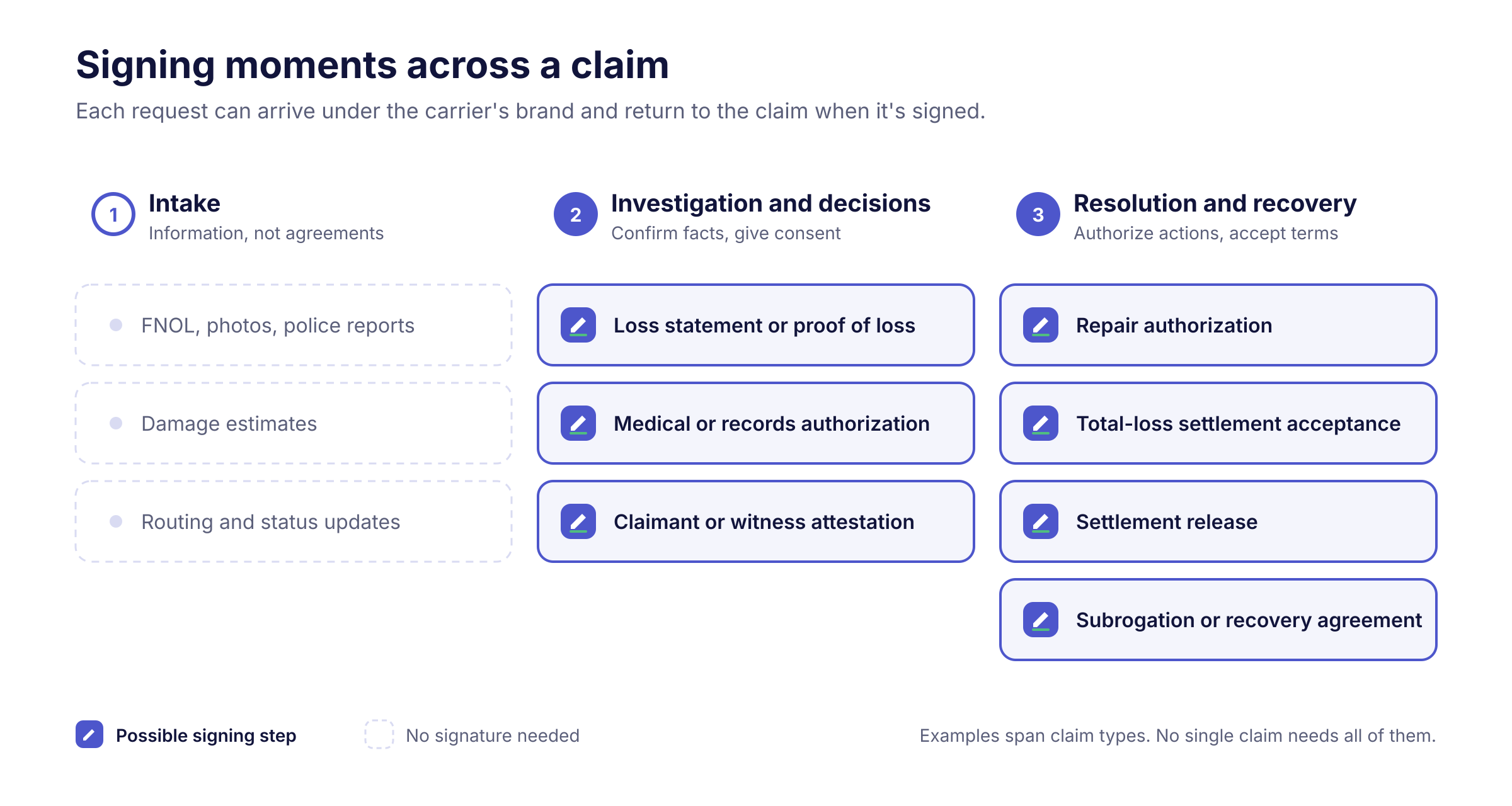
Signing moments across a claim
These examples span different claim types and lines of business. No single claim needs all of them, and whether a step calls for a signature depends on the document, the policy, the jurisdiction, and the carrier's own process.
| Claims stage | Document or signing action | Likely signer | What completing it enables |
|---|---|---|---|
| Investigation | Signed loss statement or proof of loss | Insured | A formal statement of the facts and amount claimed, where policy conditions or the carrier's process call for one |
| Investigation | Medical or other records authorization | Claimant or injured party | Requests for the specified records can go out under the applicable workflow |
| Investigation | Claimant or witness attestation | Claimant or witness | A signed statement on file where a formal attestation is needed |
| Resolution | Repair authorization | Vehicle or property owner | The required approval for the repair process, where the carrier or platform controls that step |
| Resolution | Total-loss settlement acceptance | Owner and any other required parties, such as a lienholder | Documented acceptance of approved terms, plus eligible supporting paperwork |
| Resolution | Settlement release | Claimant and any other required parties | The release requirement is met before the next authorized settlement action |
| Recovery | Subrogation or recovery agreement or release | Other carrier, responsible party, or insured | Agreed recovery terms are recorded for the teams completing that process |
A signed release meets the release requirement. It doesn't, on its own, establish that every other payment prerequisite has been met.
Some documents, including vehicle title, odometer, and power-of-attorney forms, have additional execution requirements. Confirm the requirements for the document and jurisdiction before including them in an electronic signing workflow.
What a branded signing experience includes
For the person signing, white-label eSignature covers the whole interaction, from the first message to the completed record:
- The invitation. The request uses the carrier's name, sending domain, and language, so the requesting party is clear.
- The signing interface and instructions. The document and signing screens look and read like the carrier's other communications. Where signing is embedded, it happens inside the carrier's portal or app rather than through a redirect.
- Completion. The confirmation message reflects the same brand.
- The completed signing package. Branding can extend to disclosures, the certificate of completion, and the audit record, as described on the Verdocs white-label page.
The brand is usually the carrier's. In a TPA or delegated claims arrangement, it may be the brand the carrier and its partner have chosen for that customer interaction.
A third-party claimant may have no relationship with the insurer handling the claim, and a first-party claimant is often dealing with a stressful loss. Clear identity and continuity make it easier to see who is asking and why. Branding doesn't prevent fraud on its own, and it doesn't guarantee a signer will finish. It removes avoidable confusion from a step that already asks a lot of the person.
Branding and integration do different jobs
Consistent branding makes the requesting party and the experience clearer for the signer. Integration makes signing status, completed documents, and next steps available to the claims system, so an adjuster can see what's outstanding without chasing emails.
Neither delivers the other: a branded request that isn't connected leaves the adjuster guessing, and a connected request under an unfamiliar name leaves the signer wondering. Verdocs supports both, with white-label branding for the signer and APIs and webhooks for the claims workflow.
For platforms serving many carriers
Claims platforms, core systems, and TPAs serve many carrier customers. With a multi-tenant white-label setup, one embedded signing integration can support each customer separately, with its own brand, sending domain, templates, recipients, and workflow settings.
A platform can also start narrow. It might begin with settlement releases, then extend the same integration to records authorizations, repair approvals, and recovery agreements as carrier customers ask for them. Each new document type still needs its own templates, data mapping, and recipient rules, but it builds on the integration that already exists rather than starting over.
Example: a signed release on an auto claim
Here's a hypothetical P&C auto claim. Liability is accepted, the adjuster approves a settlement within their authority, and the carrier's process requires a signed release before the next settlement step.
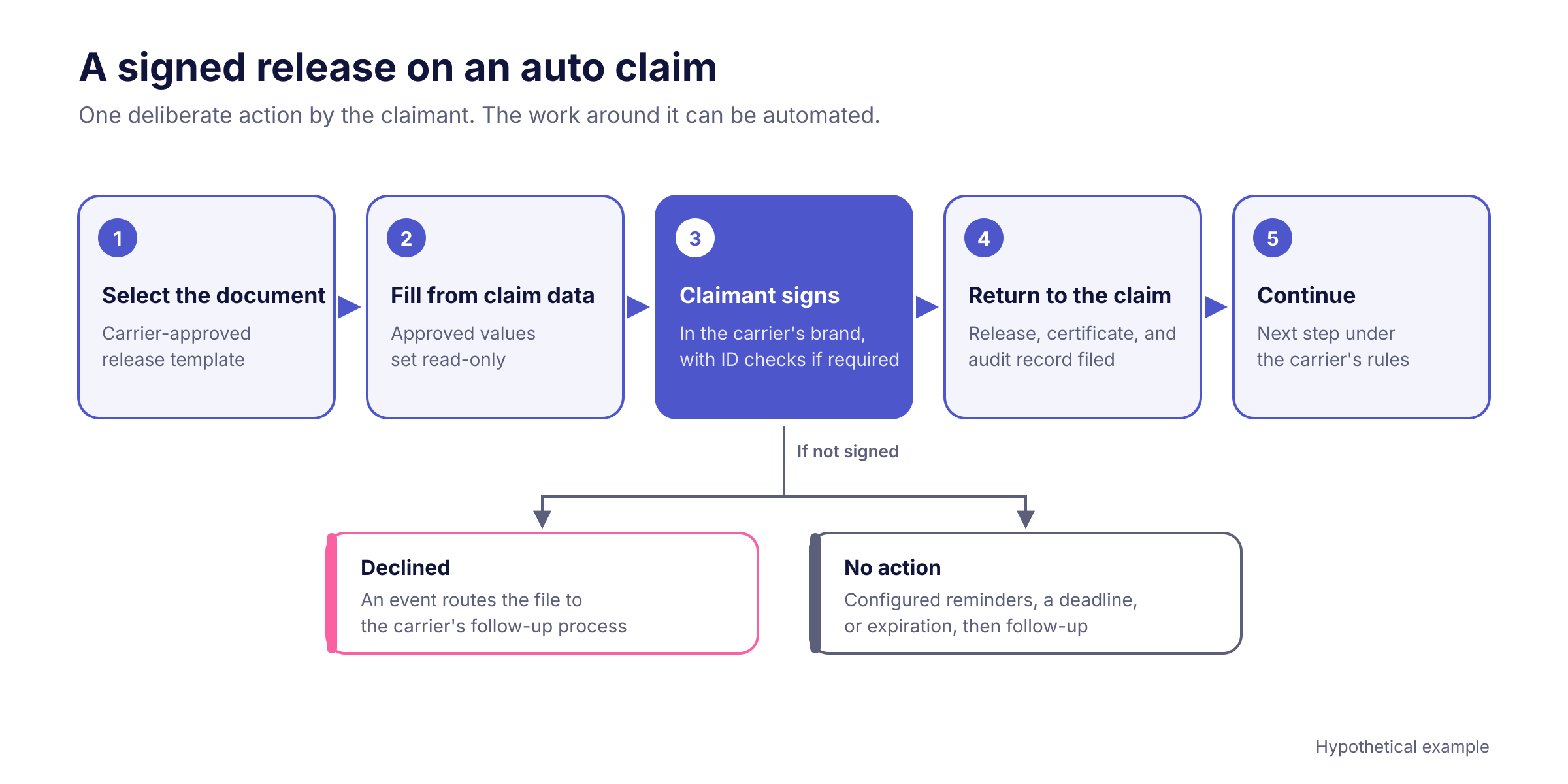
- The workflow selects the document. The claims system picks the carrier-approved release template for this claim type and jurisdiction.
- Claim data fills the fields. Claimant name, claim number, date of loss, vehicle, and settlement amount come from the claim record. Prefilled fields can be configured as read-only so the signer cannot change approved values.
- The claimant reviews and signs under the carrier's brand. The claimant signs in the carrier's portal or app. If the carrier's rules call for stronger identity checks at this amount, those run in the same flow.
- The result returns to the claim. The integration retrieves the executed release, the certificate of completion, and the audit record, files them with the claim, and updates the claim's signing status.
- The workflow continues under the carrier's rules. With the signed release on file, the claims system applies the carrier's existing rules to decide the next permitted action, such as releasing payment once every other prerequisite is met.
The claimant takes one deliberate action. The administrative work around it can be automated. If the claimant declines, the decline can trigger an event that routes the file to the carrier's follow-up process. A request that simply sits unsigned needs its own handling, such as configured reminders, a deadline, or expiration followed by an adjuster call.
Where Verdocs fits
Verdocs is embedded, white-label eSignature that carriers and claims software platforms build into their own workflows. Its role in the example above falls into four groups.
Document preparation. The claims system starts a signing workflow by API when a step calls for it, whether a rules engine, an adjuster, or an AI agent triggered it. Carrier-approved templates map fields to claim data, and the system can fill templates from claim records and validate the mapping before anything is sent.
Embedded signing and branding. Signing renders inside the carrier's portal or app as native web components, not an iframe or redirect. Each carrier can have its own brand settings and sending domain, or a platform can send invitations through its own channels.
Recipients and authentication. The workflow routes the document to the claimant and any other required parties in the order the process requires. Each recipient can get the check the transaction calls for, from an emailed link or passcode to an SMS code, knowledge-based authentication (KBA), or ID verification where appropriate and enabled. Matching Signer Verification to the Insurance Transaction covers how to choose.
Status and completed records. Webhooks tell the claims system when a document is opened, signed, or declined. When signing completes, the signed document, certificate of completion, and audit trail are available through the API for the integration to file with the claim, as described in Insurance Documents by API.
Two distinctions are worth keeping. Signer authentication helps establish who is signing; it doesn't investigate whether the claim is accurate, which stays with the adjuster and, where needed, the special investigations unit. And the audit record shows who signed, when, how they were authenticated, and which document they signed, not that they read or understood every provision.
For how automated workflows hand off to a person at the signature step, see AI Agents in Insurance: Where Human Approval Still Counts and how Verdocs works with AI agents.
Find the signatures in your claims
Pick one claim type and trace it from FNOL to close. Mark every point where someone signs, how that request reaches them today, and who can see its status.
Then consider how each of those steps could run in your own brand, connected to the claim. See how this works for insurance carriers and platforms, or schedule a demo to walk through a claims signing workflow in your own brand.